Is TradingView Premium Worth It? Plans Compared
On this page
Disclosure: ChartSetupLab earns a commission if you buy a TradingView plan through links on this page, at no extra cost to you. We only recommend a paid plan when the free one genuinely holds you back. Nothing here is financial advice.
Short answer: TradingView Premium is worth it if you watch many charts at once, run more than ten indicators, need lots of alerts, or want second-based timeframes with full history. Most part-time traders are better served by Essential or Plus, and many beginners do fine on the free Basic plan for months.
Below is every plan side by side, who each one is really for, and the mistakes that make people overpay.
Every TradingView plan at a glance
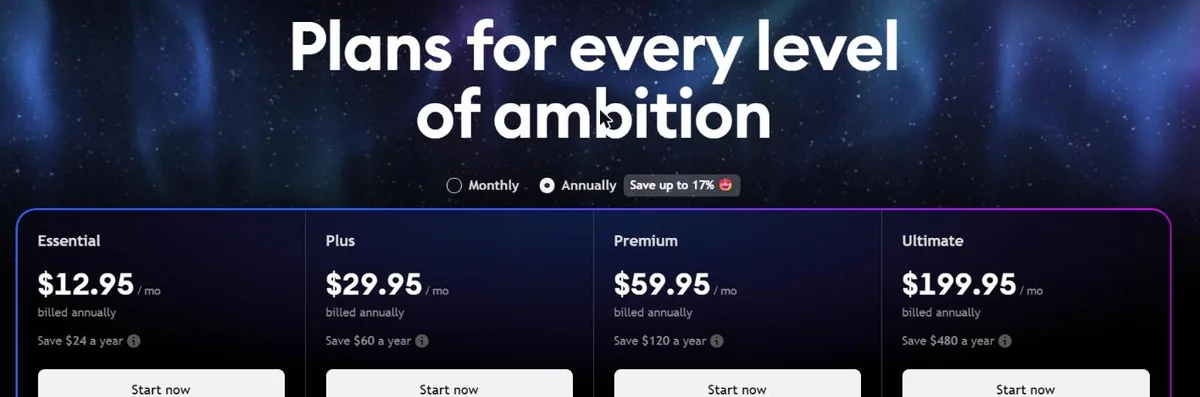
Prices are in USD before tax, as listed on TradingView's pricing page in October 2026. Annual billing is shown as the monthly equivalent.
| Plan | Monthly billing | Annual billing (per month) | Charts per tab | Indicators per chart | Historical bars | Price alerts |
|---|---|---|---|---|---|---|
| Basic | Free | Free | 1 | 2 | 5,000 | 3 |
| Essential | $14.95 | $12.95 | 2 | 5 | 10,000 | 20 |
| Plus | $34.95 | $29.95 | 4 | 10 | 10,000 | 100 |
| Premium | $69.95 | $59.95 | 8 | 25 | 20,000 | 400 |
| Ultimate | $239.95 | $199.95 | 16 | 50 | 40,000 | 1,000 |
Paid plans also remove ads, unlock custom timeframes, Bar Replay on intraday charts and volume profile tools, and add webhook alerts for automation. Market data for some exchanges is sold separately on every plan.
Who each plan is actually for
Basic (free): learning and casual checking
If you look at a few charts a day, draw trend lines and use one or two indicators, Basic is enough. The limits you will hit first are the two-indicator cap and the three price alerts. Ads are mildly annoying but not a dealbreaker. Read our full guide to the free plan limits and how to work around them before paying.
Essential: the cheapest real upgrade
Essential fixes the two most common frustrations: you get five indicators per chart and 20 alerts, plus two charts side by side. It also adds webhook alerts, which you need if you plan to send signals to a bot or a trade-copier. For a swing trader who checks the market once or twice a day, this is usually the sweet spot.
Plus: for active day traders
Plus doubles everything that matters during a busy session: four charts per tab, ten indicators, 100 alerts and a year of minute-level history. If you trade one market across several timeframes (for example 1-minute, 5-minute, 15-minute and 1-hour), four charts in one tab is the reason to choose Plus.
Premium: for multi-market traders and system builders
Premium is where TradingView becomes a workstation. Eight charts per tab, 25 indicators, 400 alerts, watchlist alerts, 20,000 bars of history and full minute and second data. It earns its price if you scan many symbols, backtest strategies on long histories, or automate with lots of alerts. If none of those describe you, you are paying for capacity you will not use.
Ultimate: for professionals and heavy automation
Ultimate doubles Premium again and adds tick-level history. TradingView says it is the only plan available to professional users, so if you trade for a firm or are classed as a professional data user, this is the plan you are steered toward. For an individual trader, it is rarely necessary.
Is Premium worth it? Three quick tests
Answer these honestly:
- Do you regularly need more than four charts on one screen? If yes, Premium (eight) is the cheapest plan that does it.
- Do you run more than ten indicators on a single chart, or more than 100 alerts? If yes, Premium.
- Do you backtest or automate strategies that need deep intraday or second-based history? If yes, Premium.
If you answered no to all three, Plus or Essential will feel almost identical day to day, and you keep the difference.
How to avoid overpaying
- Use the free trial first. Essential, Plus and Premium have historically come with a 30-day trial, and Ultimate with 14 days, subject to eligibility. Use it during a normal trading week so you see what you actually use. Start the trial through our referral link.
- Pay annually only after the trial. Annual billing saves roughly 13 to 17 percent, and TradingView refunds annual plans within 14 days of payment. Monthly plans are not refundable.
- Wait for Black Friday if you can. TradingView's largest sale usually runs in late November. Last year Premium was discounted far more than the usual annual saving. The 2026 dates had not been announced when we wrote this.
- Start one tier lower. Upgrading mid-subscription is easy; you lose little by starting on Plus and moving up if you hit a limit.
- Check market data costs separately. Some real-time exchange data is an add-on on every plan, so budget for it if you trade those markets.
Our pick for most readers
| If you are… | Choose |
|---|---|
| Learning, checking charts a few times a week | Basic |
| Swing trading, a handful of alerts | Essential |
| Day trading one or two markets on multiple timeframes | Plus |
| Scanning many symbols, heavy backtesting or automation | Premium |
| A professional user or running large-scale automation | Ultimate |
FAQ
Can I switch plans later? Yes. You can upgrade at any time, and the change applies to your account straight away.
Does a paid plan give me real-time data for every market? No. Some exchanges charge separately for real-time data on all plans.
Is TradingView Premium good for crypto? Most crypto data on TradingView is available without an extra data fee, so the decision comes down to charts, indicators and alerts, exactly as above.
Do paid plans make me a better trader? No. They remove limits. A clear plan and risk management matter far more than the number of charts on your screen.
Prices and limits change. We check them every quarter; last checked: October 2026.